
AI Note Takers That Actually Do Your Homework (Kidding)
The Real Reason Students Are Switching to AI Notes in 2026
AI notes for students are changing how people survive college — and the numbers back it up.
Here are the best AI note-taking tools available right now:
| Tool | Best For | Free Tier |
|---|---|---|
| StudyFetch | All-in-one notes + AI tutor | Yes |
| NoteGPT | YouTube & multimedia summarization | Yes (15 uses/month) |
| Otter.ai | Live lecture transcription | Yes |
| Turbo AI | STEM subjects + live recording | Yes |
| Mindgrasp | Full study system (notes, quizzes, flashcards) | Free trial |
| LectureNotes | Video capture + exam prep | Yes (15 credits/month) |
| Kiwi AI | Mobile-first studying | Yes |
| Polar Notes | Offline use + privacy | Yes |
| StudyX | Quick notes from any format | Yes (5/day) |
| Studygenie | Enhancing your own handwritten notes | Free trial |
Let’s be honest. Between lectures, assignments, part-time jobs, and trying to have some kind of social life, there’s barely enough time to breathe — let alone take perfect notes.
That’s exactly why so many students are turning to AI note-taking tools.
These apps can turn a recorded lecture into organized, searchable notes in under 30 seconds. Some go further — generating flashcards, quizzes, and study guides automatically. Tools like LectureNotes report users saving 15 hours per week, and Mindgrasp has already powered over 2 million study sessions across 128 countries.
This isn’t about cutting corners. It’s about working smarter when your plate is already full.
Below, we compare the top AI note tools for students in 2026 — covering features, pricing, accuracy, and which one fits your specific situation best.
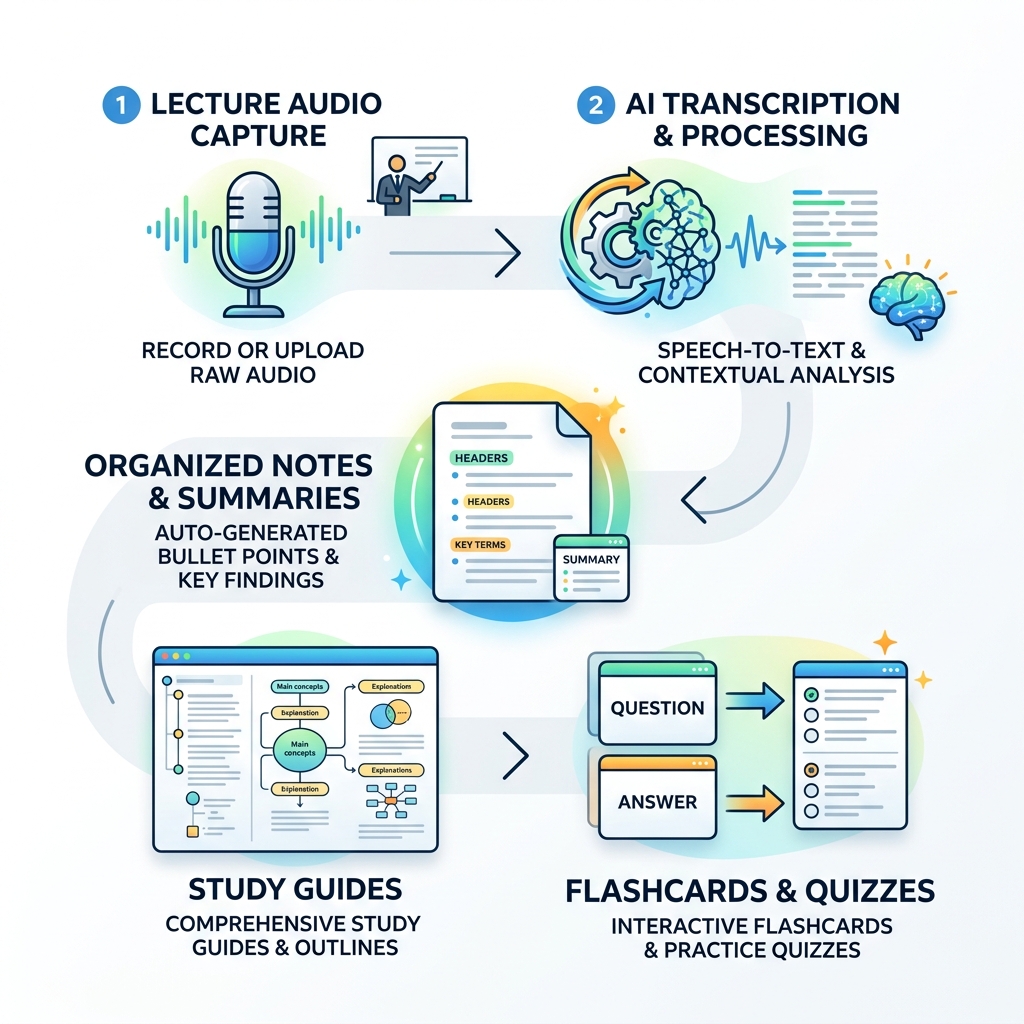
How AI Notes for Students Work
If you’ve ever stared at a blank Google Doc while a professor speed-talks through 40 slides, you know the struggle. AI notes for students solve this by using three core technologies: Natural Language Processing (NLP), speech-to-text transcription, and pattern recognition.
First, the tool “listens” or “reads.” If you upload a recording, speech-to-text engines transcribe every word with high precision. Then, the NLP kicks in to understand context. It doesn’t just give you a wall of text; it identifies what is a main heading, what is a supporting detail, and what is just the professor complaining about the parking lot. This is how AI digital note-taking transforms student learning—it filters the noise so you can focus on the signal.
Beyond simple summaries, these tools use pattern recognition to create AI-powered tools for effective student notetaking that mimic human logic. They can spot recurring themes and automatically group them into sections like “Key Definitions” or “Exam Topics.”
We know what you’re thinking: “Is my data safe?” Most top-tier tools implement industry-standard data encryption and privacy measures. For example, some apps store data locally on your device, while others comply with GDPR and CCPA regulations to ensure your lecture recordings aren’t being used to train the next world-dominating robot.

Top AI Note-Taking Tools for Academic Success
Choosing the right tool depends on whether you’re a visual learner, a STEM major, or someone who lives on their phone. Using the right app can lead to significant grade improvement and better time management. In fact, some students report that AI note apps for college students are a game changer because they eliminate the “transcription fatigue” that leads to burnout.
By offloading the manual labor of writing, you can boost productivity with smart AI note-taking apps and actually participate in class discussions. Here is a deeper look at the heavy hitters of 2026.
Best All-in-One AI Notes for Students: StudyFetch and NoteGPT
If you want a tool that does everything but the laundry, these two are the gold standard.
StudyFetch is a powerhouse that claims to increase studying productivity by 30%. Its “Notes AI” feature takes PDFs, PowerPoints, or lecture videos and turns them into structured outlines in seconds. What makes it stand out is Spark.E, an integrated AI tutor. You can literally chat with your notes, asking Spark.E to explain a confusing paragraph or quiz you on the material.
NoteGPT, on the other hand, is a massive favorite with over 80,000,000 users worldwide. It is specifically famous for its YouTube summarizer. If you’re learning from Khan Academy or university-uploaded videos, NoteGPT can transcribe and summarize the video, then turn that info into visuals or podcasts. It’s an incredible way to harness the power of AI for class notes management across different media types.
Best for Live Lectures and STEM: Otter.ai and Turbo AI
For students who attend a lot of live, lectures, real-time speed is everything.
Otter.ai is the veteran in this space. It provides real-time captions and notes, which is a lifesaver for accessibility. It connects to your calendar and can automatically join Zoom, Teams, or Google Meet sessions to record and summarize. Students love it because it captures slides automatically during virtual meetings, providing visual context to the transcript.
For the math and science crowd, Turbo AI – AI Note Taker & Study Tools is the go-to. Formerly known as Turbolearn, this tool is trusted by over 5 million students for its ability to handle STEM subjects. Unlike basic AI that gets confused by “x + y,” Turbo AI preserves formulas, diagrams, and even code snippets. It’s specifically designed for leveraging AI tools for structured lecture notes in technical fields where formatting is just as important as the text.
Best Mobile and Offline AI Notes for Students: Polar Notes and Kiwi AI
If you’re always on the move or studying in a library with patchy Wi-Fi, you need something lightweight and reliable.
AI Note Taker App For Students | Turn Lectures Into Notes by Polar Notes is a standout for privacy and offline use. It’s an iOS-first app that allows you to record lectures and generate “Study Packs” (guides, quizzes, and flashcards) directly on your device. Since it can work offline, your notes stay private and accessible even without a connection.
Kiwi AI – The #1 AI assistant for students was actually developed by students who felt the traditional education system was failing to keep up with modern tech. It’s loved by over 500,000 users for its “concise mode,” which strips away the fluff from long readings. It’s a great example of how you can revolutionize your notes with AI by using a tool built by people who actually understand the modern student’s daily grind.
Key Features to Look for in an AI Note Taker
When you’re shopping around for ai notes for students, don’t just look at the summary feature. The best tools offer a full ecosystem of study aids.
- Flashcard Generation: Tools like LectureNotes – Smart Lecture Notes can automatically create flashcards from your lecture. This encourages active recall, which is scientifically proven to help you remember things longer than just re-reading.
- Grade Improvement Stats: It’s not just marketing talk. LectureNotes users report 92% higher grades and save an average of 15 hours per week.
- Automatic Summarization: This is the bread and butter of these apps. Revolutionizing lecture notes with AI’s automatic summarization means turning a 60-minute rambling lecture into a 5-minute read.
- Multi-Format Support: You should be able to turn a PDF textbook chapter into a set of notes just as easily as a recorded audio file.
- Organization: Look for tools that allow you to create folders for different classes, making it easy to streamline your research with AI note organizing apps.
Frequently Asked Questions about AI Note Taking
Are there free AI note takers for students?
Yes, almost every major tool has a way to use it for free. However, they usually follow a “freemium” or credit-based model.
- StudyX offers 5 free uses per day, which is plenty for a standard class schedule.
- LectureNotes and NoteGPT give you a set number of credits (usually around 15) per month.
- Many others offer a free trial that lets you test the full features on a few real lectures before committing. Checking out a guide to AI note-taking extensions for improved studies can also help you find free browser-based tools that work directly in Chrome.
Can AI handle complex STEM subjects and diagrams?
This used to be a weakness, but 2026 technology has caught up. Tools like AI Lecture Note Taker | Never Miss a Detail | Studygenie are excellent at “gap-filling.” If you take shorthand notes on a complex finance or engineering topic, the AI identifies the abbreviations and technical terms and expands them with accurate definitions. This is vital to enhance high school learning with efficient AI note-taking as subjects get more specialized.
How do these tools ensure student data privacy?
Privacy is a top priority for reputable companies. Many tools now offer:
- Local Storage: Like Polar Notes, where data stays on your phone.
- GDPR/CCPA Compliance: Ensuring your data isn’t sold to third parties.
- Encryption: Protecting your uploads from unauthorized access. When you revamp your study notes with AI organizers, always check the settings to see if you can opt-out of “AI Training,” which prevents the company from using your specific notes to improve their general models.
Conclusion
At Vida em Jardim, we believe that productivity isn’t about doing more work—it’s about getting better results with the time you have. AI notes for students are no longer a futuristic luxury; they are essential equipment for the modern academic journey.
Whether you choose the all-in-one power of StudyFetch, the STEM-focused accuracy of Turbo AI, or the mobile convenience of Kiwi AI, the goal is the same: to reduce stress and help you master your subjects. By choosing to transform your learning with AI note-taking platforms, you’re giving yourself the space to actually learn rather than just record.
Ready to dive deeper into smart studying? Explore our full AI Note-Taking category for more tips, tutorials, and tool deep-dives!
