
The Best Note-Taking AI for Students Free of Charge
Why You Need a Note-Taking AI for Students Free of Charge
The best note-taking ai for students free options right now are:
| Tool | Best For | Key Free Feature |
|---|---|---|
| NotebookLM | Research & PDFs | 100% free, no paid plan |
| Turbo AI | Live lectures | Notes, flashcards & quizzes |
| Knowt | Study aids | Flashcards + AI tutor (Kai) |
| NoteGPT | All-in-one learning | 15 free actions/month |
| KaraX.ai | In-class recording | Offline recording + 99% accuracy |
You’re sitting in a 90-minute lecture, trying to write everything down and actually understand it at the same time. Sound familiar?
Most students know the feeling: by the time class ends, your notes are a mess, your hand hurts, and you’ve barely absorbed anything. It’s not a focus problem. It’s a system problem.
AI note-taking tools solve this by doing the transcribing, summarizing, and organizing for you — so you can actually listen.
The good news? You don’t need to pay for it. Several genuinely powerful tools offer free plans that aren’t just watered-down demos. Some, like NotebookLM from Google, are completely free with no paid plan at all.
But not every “free” tool delivers. Some cap you at a handful of minutes per month or strip out the most useful features to push you toward a subscription. This guide cuts through that noise.
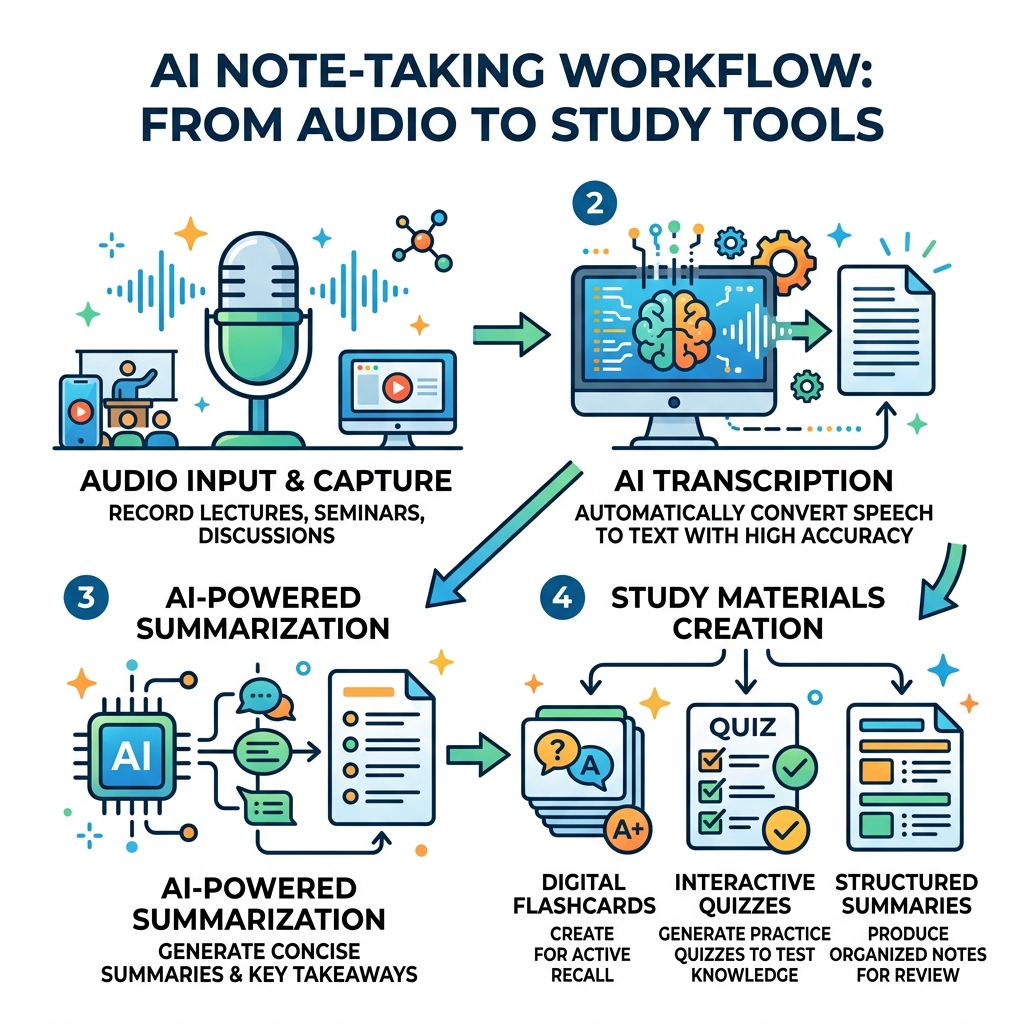
At Vida em Jardim, we believe that academic success shouldn’t be a test of how fast you can type. By leveraging a note-taking ai for students free of charge, you can automate the mechanical part of learning—transcription and formatting—and spend your energy on critical thinking and memorization.
Research shows that students who use AI to generate structured notes often see a significant boost in study completion rates. Imagine saving five to six hours a week that you used to spend re-typing messy handwritten notes. That is time you could use for sleep, exercise, or actually hanging out with friends.
Top-Rated Free AI Tools for Automated Lecture Notes
When searching for the best note-taking ai for students free tiers, you have to look past the marketing fluff. Many “free” plans are actually just demos that lock you out after a single 30-minute lecture. We’ve vetted the tools that actually provide recurring value.
| Tool | Monthly Transcription / Usage Limits | Core Free Features |
|---|---|---|
| tl;dv | Unlimited recordings & transcripts | 10 AI summaries per month; 40+ languages |
| NoteGPT | 15 quotas per month | Summaries for YouTube, PDF, and PPT |
| KaraX.ai | Generous free tier | Offline recording; Academic term recognition |
| Paradiso AI | Free version available | Multi-platform integration (Zoom/Teams/Meet) |
| NotebookLM | No limits (100% Free) | Document analysis; Podcast generation |
tl;dv
If your classes are mostly on Zoom, Google Meet, or Microsoft Teams, tl;dv (which shares a similar mission of efficiency with our favorite study tools) is a powerhouse. Its free plan is incredibly generous, offering unlimited video recordings and transcripts. While it limits the number of “AI summaries” you get per month to ten, the fact that you can record every single lecture for free and search through the text later is a game-changer for finals week.
Paradiso AI
For those looking for a professional-grade assistant, the Free AI Note Taker | Paradiso AI offers a way to bridge the gap between classroom and career. It focuses on high-speed transcription and integrates directly into your calendar. We find it particularly useful for group projects and student organizations where keeping track of “action items” is just as important as the notes themselves.
NoteGPT
NoteGPT is the “Swiss Army Knife” of AI assistants. With over 80 million users, it’s a massive platform that handles everything from YouTube videos to long-form PDFs. On the free plan, you get 15 “quotas” per month. This is perfect for the student who needs to summarize a specific research paper or a complex Khan Academy video rather than recording every single daily lecture.
KaraX.ai
KaraX.ai is specifically built for the classroom. It boasts a 99% accuracy rate and is trained on real classroom audio, which is notoriously difficult for AI because of echoing lecture halls and shuffling papers. It also features “academic term recognition,” so it won’t get confused when your professor starts talking about “mitochondrial DNA” or “macroeconomic equilibrium.”
Choosing the Right Note-Taking AI for Students Free for Live Lectures
Selecting a tool for live lectures is different from picking one for homework. In a live setting, you need three things: accuracy, speaker identification, and mobile access.
- Transcription Accuracy: If the AI can’t handle your professor’s accent or technical jargon, the notes are useless. Tools like KaraX.ai and Turbo AI excel here because they are trained on academic data.
- Speaker Identification: In a seminar or a discussion-heavy class, you need to know who said what. Look for tools with “diarization”—that’s the fancy AI term for recognizing different voices.
- Mobile Accessibility: Let’s be real—sometimes you don’t want to lug your laptop to a 9:00 AM class. A mobile-first app allows you to record from your phone while it sits on your desk, automatically syncing the notes to your laptop for later.
For a deeper dive into how to organize what the AI gives you, check out our guide on Leveraging AI Tools for Structured Lecture Notes.

Maximizing a Note-Taking AI for Students Free for Research and PDFs
Not all learning happens in the lecture hall. A huge chunk of your time is spent staring at 50-page PDF research papers or watching three-hour YouTube tutorials.
NotebookLM (Google) This is arguably the most powerful note-taking ai for students free of charge today. Because it is a Google Labs project, it is completely free. You can upload up to 50 sources (PDFs, Google Docs, or website links) into a single “notebook.”
- The “Deep Dive” Feature: It can generate a “Deep Dive” audio conversation—a literal podcast—where two AI voices discuss your notes. It’s perfect for listening to your research while you’re at the gym or commuting.
- Grounded Answers: Unlike ChatGPT, which might hallucinate, NotebookLM only answers questions based on the documents you uploaded.
Turbo AI Formerly known as TurboLearn, Turbo AI is a favorite for its speed. It can take a YouTube link or a PDF and turn it into a full set of notes in about 30 seconds. If you’re a visual learner, it even creates diagrams and mind maps to help you see how concepts connect. This is why we often refer to these platforms as a Game Changer for College Students.
Essential Features: From Flashcards to STEM Support
A great note-taking ai for students free plan shouldn’t just give you a wall of text. It should help you study. Here are the “extra” features you should look for:
- Flashcard Generation: Tools like Knowt and Turbo AI automatically pull out key terms and create flashcards. This allows you to jump straight into active recall, which is the most effective way to study.
- Quiz Creation: After a lecture, use the AI to generate a 10-question quiz. If you can’t pass the quiz the AI made from your own notes, you know exactly what you need to go back and review. For more on this, see how to use AI note-taking tools to ace your exams.
- STEM Formula Recognition: Many AI tools struggle with math. However, Turbo AI and NoteGPT are designed to handle LaTeX, chemical equations, and physics diagrams. They preserve the formatting so your “H2O” doesn’t turn into “H twenty.”
- Mind Mapping: Visual learners should look for NoteLyn or Turbo AI, which can turn a linear transcript into a web of connected ideas. This is incredibly helpful for subjects like History or Philosophy where you need to track how one idea influenced another.
Privacy and Data Security for Academic Content
As students, we often overlook privacy, but it’s vital. You are uploading your intellectual property—and sometimes your professor’s—to a server.
We recommend prioritizing tools that are GDPR compliant or have SOC 2 Type II certification. This ensures that your data is encrypted and handled responsibly.
One of the biggest concerns is AI Model Training. Some free tools “pay” for their service by using your notes to train their next AI model. If you are working on a sensitive research project or a patent-pending idea, look for tools like NotebookLM or NoteLyn that explicitly state: “Your content is never used to train third-party models.”
For more on how this technology is changing the landscape, read about how AI digital note-taking transforms student learning.
Frequently Asked Questions about Free AI Note-Takers
How accurate are free AI transcriptions with technical jargon?
Most top-tier free tools like KaraX.ai and Turbo AI use advanced models (like Whisper) that hit about 95–99% accuracy. They are surprisingly good at technical terms in medicine, law, and engineering. However, if your professor has a very thick accent or if the room is extremely echoey, you might see that drop to 85%. Always do a quick “spot check” of your notes after class!
Are there limits on lecture length for free AI tools?
Yes, this is the most common “hidden cost.”
- Otter.ai caps you at 30 minutes per meeting.
- tl;dv allows unlimited length but limits the number of AI-generated summaries.
- NotebookLM has no time limits because it processes files rather than live audio. If you have a 3-hour lab, we recommend using a tool like Krisp or KaraX.ai which are more forgiving with long sessions.
Can I use these AI note-takers offline during class?
Most AI processing happens in the “cloud,” meaning you need the internet. However, KaraX.ai has a brilliant “offline recording” mode. You can record the entire lecture without Wi-Fi, and the app will automatically upload and summarize it as soon as you connect to the campus network.
Conclusion
Finding the right note-taking ai for students free of charge is about matching the tool to your specific workflow. If you are a research-heavy student, NotebookLM is your best friend. If you are a STEM major who needs to record live lectures, Turbo AI or KaraX.ai will be more your speed.
At Vida em Jardim, we are dedicated to helping you navigate these tools to find the perfect balance between academic rigor and personal well-being. By automating the tedious parts of your education, you open up space for true learning and development.
Ready to level up your study game? Explore More AI Note-Taking Strategies on our blog and start transforming your grades today!
